






Zoho Sign Explained: Features, Pricing, Benefits, and Use Cases for 2025
Introduction
In an increasingly digital world, obtaining physical signatures slows down business processes and adds unnecessary complexity. Zoho Sign is an e-signature solution that lets organizations create, send, and manage legally binding digital signatures—all from the cloud. Trusted by businesses across industries, Zoho Sign streamlines document workflows, boosts security, and accelerates turnaround times.
What Is Zoho Sign?
Zoho Sign is a cloud-based electronic signature platform launched by Zoho Corporation to facilitate secure, paperless signing of agreements, contracts, NDAs, and more. It supports multiple file formats (PDF, DOCX, PNG, JPEG) and integrates natively with popular cloud storage providers like Google Drive, OneDrive, Dropbox, and Zoho WorkDrive.
Key Features of Zoho Sign
1. Document Preparation & Templates
Upload documents in 12+ formats (PDF, DOCX, JPG, PNG) and add signature or form fields automatically with text tags.
Convert recurring contracts into reusable templates to save time on future workflows.
2. Customizable Signing Workflows
Define signing order for multiple recipients or allow parallel signing.
Use in-person signing mode on mobile or tablet to collect signatures on the spot.
3. Integration & Automation
Seamlessly integrate with Zoho CRM, Zoho Writer, and other Zoho apps via ready-made connectors.
Leverage REST APIs to embed e-signatures into custom applications and automate document routing.
4. Security & Compliance
Multi-factor authentication to safeguard signer identities.
Audit trails record every action—upload, view, sign—complete with timestamps and IP addresses.
Blockchain-based timestamping for tamper-evident records and legal admissibility.
5. Advanced Collaboration
Add public or private comments directly on documents to clarify points without multiple email threads.
Send reminders and track document status in real time to keep workflows moving.
6. Branding & Localization
Apply company logos, colors, and custom messages to the signing screen for a professional look.
Offer signers an interface in their native language (vernacular signing) to improve completion rates.
Benefits of Zoho Sign
⚡ Faster Turnaround: Digitally sign and return documents in minutes rather than days.
💼 Operational Efficiency: Eliminate printing, scanning, and manual filing.
🔒 Enhanced Security: Encryption at rest and in transit keeps sensitive agreements protected.
🌐 Anywhere Access: Web and mobile apps (iOS/Android) let teams send and sign on the go.
📈 Scalable Workflows: From freelancers to enterprises, scale usage without infrastructure overhead.
Zoho Sign Pricing (2025 Update)
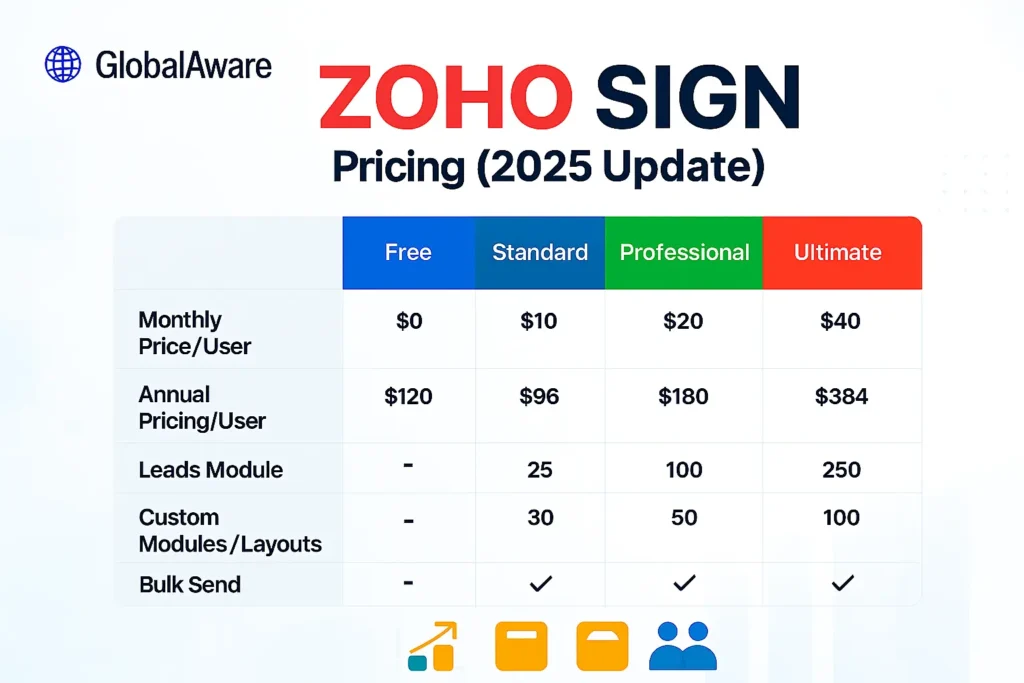
All paid plans include cloud backup to Box, Dropbox, OneDrive, and more for extra data protection.
Zoho Sign vs. Top Competitors

Why Zoho Sign Stands Out
Built-in blockchain timestamping for enhanced trust.
Out-of-the-box integration with the entire Zoho ecosystem.
Competitive pricing with a generous free tier.
How to Get Started with Zoho Sign
Sign up at zoho sign with your email—no credit card needed.
Upload your first document or choose a template.
Drag-and-drop signature and form fields onto the page.
Add recipients and define signing order.
Send for signature and track progress from the dashboard.
Native mobile apps and browser extensions make capturing signatures on the go effortless.
Download Zoho Sign – Fill & eSign Docs from Google Play store
Real-World Use Cases
Legal Firms: Streamline client agreements and retain audit-ready trails for compliance.
Real Estate Agencies: Expedite property contracts with in-person signing features on mobile devices.
HR Departments: Automate onboarding documents like offer letters, tax forms, and NDAs.
Educational Institutes: Collect parent approvals and vendor contracts without paper.
Frequently Asked Questions
Q1: Is Zoho Sign legally binding?
Yes. Zoho Sign complies with ESIGN, eIDAS, and other global e-signature laws, making signed documents legally enforceable.
Q2: Can I integrate Zoho Sign with my CRM?
Absolutely. Zoho Sign offers native integrations with Zoho CRM, Salesforce, and other leading CRMs, plus REST APIs for custom apps.
Q3: Does Zoho Sign support bulk sending?
Bulk send capabilities are available in the Enterprise plan, allowing you to send the same document to multiple recipients simultaneously.
Conclusion & Call to Action
Zoho Sign transforms cumbersome paper-based approvals into streamlined, secure digital workflows. With powerful automation, robust security, and tight integration across Zoho’s ecosystem, it’s the ideal e-signature solution for businesses of all sizes.
👉 Start Your Free Zoho Sign Trial today and experience paperless signing at its best.